• Search
  • +46 370 69 0950
  • Webshop
  • Support
  • Trainings
  • EN
    • Svenska
    • Dansk
    • Norsk
    • Suomi
    • Latviešu
    • Eesti
PLM Group logoPLM Group logoContact
  • PLM
    PLM

    PLM aligns design and engineering in a connected workflow powered by the 3DEXPERIENCE platform.

    Learn more
    • ENTERPRISE PLM
    • DIGITAL MANUFACTURING
    • SUSTAINABLE MANUFACTURING
    • PRODUCT MANAGEMENT
    • BY SOLUTION
    • VARIANT MANAGEMENT
    • CROSS COMPANY COLLABORATION​
    • E-BOM MANAGEMENT​
    • ERP INTEGRATION
    • CHANGE MANAGEMENT
    • LIFE CYCLE MANAGEMENT
    BY SERVICES
    • VALUE ASSESSMENT
    • MIGRATION
    • SOLIDWORKS PLM
    DOWNLOAD OUR LATEST E-BOOK

    Towards a smarter industry

  • CAD
    CAD

    Get your free guide Buyers guide to CAD.

    Learn more
    • BY SOFTWARE
    • SOLIDWORKS CAD
    • SOLIDWORKS ELECTRICAL
    • CATIA
    • DRAFTSIGHT
    • SOLIDWORKS PDM
    • DRIVEWORKS
    • CLOUD SERVICES IN 3DEXPERIENCE
    • OTHER SOFTWARE
    • SPECIAL OFFERS
    • FOR START UPS
    • FOR EDU
    BY SERVICES
    • SERVICE PLANS
    • INNOVATION AGREEMENTS
    • 3DEXPERIENCE ONBOARDING
    • MIGRATION
    • USER TRAININGS
    • HOSTPLM - SOLIDWORKS PDM ON CLOUD
    Choose the Right SOLIDWORKS Setup

    Understand your options, and choose the SOLIDWORKS setup that fits how you work.

  • CAM
    CAM

    Buying CAM software is a big decision. In our no-nonsense Buyer's Guide we help you find the right software for your machine shop.

    DOWNLOAD GUIDE
    BY SOFTWARE
    • SolidCAM
    • SolidCAM for Education
    • Customer Story: Rasi Maskinfabrik
    • Customer Story: IJ Pipe
    • Modules
    • CAM Assist
    • iMachining
    BY SERVICES
    • SolidCAM Trial
    • Postprocessors
    • User Trainings
  • SIMULATION
    SIMULATION

    Simulations reveal how your product performs in the real world, so you can improve it with confidence.

    Learn more
    BY SOFTWARE
    • SIMULIA
    • 3DEXPERIENCE Simulation
    • SIMULIA Abaqus Structures
    • SIMULIA CST Electromagnetics
    • SIMULIA Simpack Multibody
    • SOLIDWORKS Simulation
    • SOLIDWORKS Simulation
    • SOLIDWORKS Flow Simulation
    • SOLIDWORKS Plastics
    BY SERVICES
    • SIMULATION STARTER
    • USER TRAINING
    • SERVICE PLANS
    • SIMULATION BUYER'S GUIDE
  • KNOWLEDGE
    KNOWLEDGE

    Get an overview of the trainings we can offer for you and your team.

    ALL TRAININGS
    RESOURCES FOR YOU
    CASES
    • RESOURCES FOR YOU
    • ARTICLES
    • E-BOOKS
    • EVENTS AND WEBINARS
    • ALL RECORDINGS
    • SUBSCRIBE
    • ENGINEERING NEWSLETTER
    • SIMULATION NEWSLETTER
    • 3D PRINTING NEWSLETTER
    • CASES
    • Estanc | SOLIDWORKS PDM
    • Sea Technology | 3DEXPERIENCE CATIA
    • SwePart Transmission | 3DEXPERIENCE
    • The Loop Factory | SOLIDWORKS
    • SANOVO Technology | SOLIDWORKS
    • Pinomatic | SOLIDWORKS PDM
    • Schur Automation | SOLIDWORKS PDM
    • UP Catalyst | SOLIDWORKS Simulation
    • Satateräs | HostPLM
    • ALL CASES
    Upcoming events
    Events and webinars
    DOWNLOAD OUR LATEST E-BOOK

    Towards a smarter industry

  • CONTACT US
    CONTACT US

    HELP & SUPPORT

    Help center
    Frequently asked questions
    OPENING HOURS
    09:00-18:00
    CONTACT
    +46 370 690950
    FOR REMOTE HELP
    Teamviewer
    ONLINE SUPPORT
    FIND YOUR NEAREST OFFICE
    PLM GROUP
    • About us
    • Meet us
    • Careers
  • Search
  • +46 370 69 0950
  • Webshop
  • Support
  • Trainings
  • EN
    • Svenska
    • Dansk
    • Norsk
    • Suomi
    • Latviešu
    • Eesti

How to Use the Side Panel in SOLIDWORKS to Edit 3DEXPERIENCE Properties

Lars Haaland

Specialist 3DEXPERIENCE

LnRiLWNvbnRhaW5lciAudGItY29udGFpbmVyLWlubmVye3dpZHRoOjEwMCU7bWFyZ2luOjAgYXV0b30gLndwLWJsb2NrLXRvb2xzZXQtYmxvY2tzLWNvbnRhaW5lci50Yi1jb250YWluZXJbZGF0YS10b29sc2V0LWJsb2Nrcy1jb250YWluZXI9IjkwMTUxMGVlMzU2NmY0ZWMzMzg4NGMyNzAzOWFmODQzIl0geyBiYWNrZ3JvdW5kOiByZ2JhKCAyNTUsIDI1NSwgMjU1LCAxICk7cGFkZGluZzogMjVweDsgfSBAbWVkaWEgb25seSBzY3JlZW4gYW5kIChtYXgtd2lkdGg6IDc4MXB4KSB7IC50Yi1jb250YWluZXIgLnRiLWNvbnRhaW5lci1pbm5lcnt3aWR0aDoxMDAlO21hcmdpbjowIGF1dG99IH0gQG1lZGlhIG9ubHkgc2NyZWVuIGFuZCAobWF4LXdpZHRoOiA1OTlweCkgeyAudGItY29udGFpbmVyIC50Yi1jb250YWluZXItaW5uZXJ7d2lkdGg6MTAwJTttYXJnaW46MCBhdXRvfSB9IA==

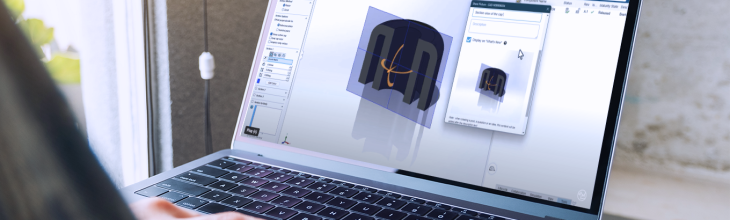
Switching between SOLIDWORKS and the 3DEXPERIENCE platform just to check or update properties interrupts your workflow. The Side Panel in SOLIDWORKS removes that friction by letting you view and edit platform attributes directly on your model. Here’s how it works, and what to watch for

Why This Matters to You

In a connected CAD environment, property management is constant:

  • Revision comments
  • Descriptions
  • Metadata tied to lifecycle

Without a direct workflow, you risk:

  • Slower updates
  • Data inconsistencies
  • Unnecessary context switching

Watch the video below and see how you use the side panel the best possible way.

Using the Side Panel

To access platform attributes inside SOLIDWORKS:

  • Open a model saved to 3DEXPERIENCE
  • Go to View → Display Side Panel
  • Select your component

You’ll see all relevant 3DEXPERIENCE attributes directly linked to the model.

Editing Properties

From the Side Panel:

  • Click the pencil icon
  • Modify attributes such as revision comments

Be aware of:

  • Revision comments → update instantly (no save required)
  • Description (bi-directional) → requires save to synchronise

This distinction is critical to avoid confusion during updates.

Permissions and Best Practice

Property editing depends on:

  • User rights → required for modification
  • Release state → released parts cannot be edited

Recommended ways of working:

  • Lock the file before editing
  • Make your changes
  • Unlock when done

FAQ

  1. Can I edit 3DEXPERIENCE properties in SOLIDWORKS?
    Yes, using the Side Panel you can view and edit platform attributes directly.
  2. Do all changes require saving?
    No. Some update instantly, while bi-directional properties (like description) require saving.
  3. Why can’t I edit certain properties?
    Either you lack permissions or the component is released.
  4. Should I lock the file before editing?
    Yes, to avoid conflicts in collaborative CAD workflows.
Posted in 3DEXPERIENCE, SOLIDWORKS 3D CAD
Tagged SOLIDWORKS

Related posts

Related Posts

Increase CAD collaboration by using a cloud-based platform

How to Increase CAD Collaboration for SOLIDWORKS Users 

You are most likely already using a cloud-based platform in different aspects of your workflow. Why not increase collaboration with one developed for CAD users?

Read More

How to Find and Manage Your Dashboards on the 3DEXPERIENCE Platform

Find and manage dashboards on the 3DEXPERIENCE platform to stay optimized and quickly find what you need

Read More
A user sharing an image of a CAD file on the 3DEXPERIENCE platform to a community using the 3DSwym app

How to Easily Share CAD Updates with Non-CAD Users on 3DEXPERIENCE

Do colleagues often ask to see the latest version of a CAD file, but they don’t have access to CAD software themselves? There’s an efficient way to share CAD updates using the 3DSwym app on the 3DEXPE...

Read More
PLM Group EU
OPENING HOURS
09:00-18:00
CONTACT
+46 370 690950
FOR REMOTE HELP
Teamviewer

PLM Group Sverige AB

Axel Danielssons Väg 267, 215 82 Malmö, Sweden

info@plmgroup.eu

+46 370 69 0950

Design

  • SOLIDWORKS
  • CATIA
  • DriveWorks
  • 3DEXPERIENCE

Simulation

  • SIMULIA
  • SOLIDWORKS

Manufacturing

  • SolidCAM
  • SOLIDWORKS MBD
  • SOLIDWORKS Inspection
  • 3D Printing

PLM

  • 3D EXPERIENCE Solutions
  • CLOUD PLM
  • Data Management

Learn and Support

  • Professional Service Agreements
  • Training
  • 3D EXPERIENCE

Resources

  • Latest articles
  • Explore our Resources
  • Cases

Design

  • SOLIDWORKS
  • CATIA
  • DriveWorks
  • 3DEXPERIENCE

Simulation

  • SIMULIA
  • SOLIDWORKS

Manufacturing

  • SolidCAM
  • SOLIDWORKS MBD
  • SOLIDWORKS Inspection
  • 3D Printing

PLM

  • 3D EXPERIENCE Solutions
  • CLOUD PLM
  • Data Management

Learn and Support

  • Professional Service Agreements
  • Training
  • 3D EXPERIENCE

Resources

  • Latest articles
  • Explore our Resources
  • Cases

Follow us for more

Ever chased a perfect surface finish on a complex Ever chased a perfect surface finish on a complex part? This is where SolidCAM's simultaneous 5-axis makes all the difference.

You get a smoother surface right away with: 
Fewer finishing passes
Minimal manual work

Let’s just agree; The best finish is the one you don’t have to fix.

#cncmachining #manufacturing #engineering #camsoftware #solidcam #SolidCAMinAction #5axismachining #surfacefinish #complexparts #precisionmachining #advancedmanufacturing
Simulate Impact on Your Product 💥 Here we’ve simu Simulate Impact on Your Product 💥

Here we’ve simulated a staircase made of aluminium to see what happens when a 100 kg object falls on it from a height of 1,0 m.

Not too convincing – we’ll try steel next time. 

#Engineering #Simulation #3DEXPERIENCE
When working on a new product design, there are ma When working on a new product design, there are many choices to make. 

Sometimes including the fibers of the packaging and the footprint it leaves behind when it is no longer needed. 🌱 

Choices that are rarely seen but always felt. 

Many strive to make sustainable choices but sometimes find themselves in the space between intention and action. This uncertainty can slow things down, and suddenly the path forward is not as clear as the intention. 

That is where @the_loopfactory wants to play a role. 🦸‍♀️ 

Their idea is built on the belief that transitioning to more sustainable choices and materials requires new ways of working. 

“And it is not just about better materials. It is about making them work at scale,” says Maria Ström, CEO. 

It happens in the making, in the iterations, the learnings, and the moments when uncertainty turns into direction. 

And when those choices move all the way from intention to impact, the gap between what we aspire to and what we can actually achieve begins to close. ♾️ 
. 
. 
. 

Innovation powered by: SOLIDWORKS Design 

Full case in bio. 

#SOLIDWORKS #3DEXPERIENCE #Startup #Scaleup #3DCAD #CAD #Engineering #Sustainability #Circularity #Innovation #Productdevelopment #CADdesign
Last week Lennart explained how to quickly edit th Last week Lennart explained how to quickly edit the dimensions of a 2D sketch, but did you know you can do the same thing with a 3D sketch? 👀

#CADviceofthweek #SOLIDWORKS #engineeringlife #engineeringstudent
  • Privacy and terms
  • General Terms and Conditions